重い腰をあげて英語メール書いたぞ。
Macのgnuplotでpdf表示がおかしくなる問題、Pangoが原因らしい。Cairoに由来するのでpngcairoもダメ。
まずバージョン確認。
$ brew info pango
pango: stable 1.46.1 (bottled), HEAD

$ gnuplot --versio
gnuplot 5.2 patchlevel 8

$ brew info gnuplot
gnuplot: stable 5.4.0 (bottled), HEAD
あれ?gnuplotのバージョンがおかしい。pango、1.46.1なら良さそうだけどな。この状態で、以下のgnuplotファイルを食わせる。
set term pdf
set out "test.pdf"
p sin(x)
こうなっちゃう。
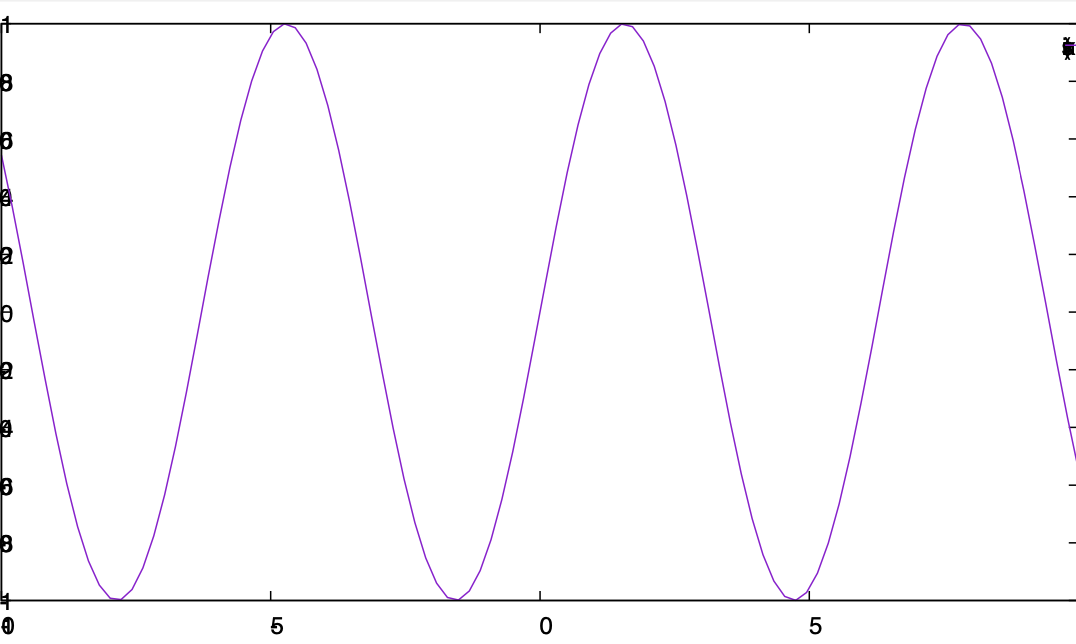
これはcairoが依存するpangoが原因なので、pngcairoもダメ。
さて、アンインストールして再インストール。
$ brew uninstall gnuplot
$ brew install gnuplot
(snip)
==> Pouring python@3.9-3.9.1.big_sur.bottle.tar.gz
Error: An unexpected error occurred during the `brew link` step
The formula built, but is not symlinked into /usr/local
Permission denied @ dir_s_mkdir - /usr/local/Frameworks
Error: Permission denied @ dir_s_mkdir - /usr/local/Frameworks
こけた。
$ brew doctor

Warning: Your Command Line Tools are too outdated.
Update them from Software Update in System Preferences or run:
  softwareupdate --all --install --force
古いそうだ。アップデートしろと言われるのでしてみる。
$ softwareupdate --all --install --force
Software Update Tool

Finding available software
No updates are available.
ダメだ。brew doctorは
If that doesn't show you an update run:
  sudo rm -rf /Library/Developer/CommandLineTools
  sudo xcode-select --install
と言ってるが、Xcodeの再インストールか・・・。するか。
sudo rm -rf /Library/Developer/CommandLineTools
sudo xcode-select --instal
あらためてソフトウェアアップデート。
$ softwareupdate --all --install --force
Software Update Tool

Finding available software

Downloading Command Line Tools for Xcode
Downloaded Command Line Tools for Xcode
Installing Command Line Tools for Xcode
Done with Command Line Tools for Xcode
Done.
結構時間かかった。あらためてbrew doctor。
$ brew doctor
(snip)
Warning: You have unlinked kegs in your Cellar.
Leaving kegs unlinked can lead to build-trouble and cause brews that depend on
those kegs to fail to run properly once built. Run `brew link` on these:
  w3m
  docker
  libmpc@0.8
  pango
  isl@0.11
  mpfr@2
  gmp@4
  unbound
  gcc@4.9
  python@3.9
(snip)
Warning: Broken symlinks were found. Remove them with `brew cleanup`:
  /usr/local/bin/texdist
ほほう。まずは消そう。
次はリンク。
$ brew link w3m docker libmpc@0.8 pango isl@0.11 mpfr@2 gmp@4 unbound gcc@4.9 python@3.9
Linking /usr/local/Cellar/w3m/0.5.3_6... 8 symlinks created
Linking /usr/local/Cellar/docker/18.09.6...
Error: Could not symlink bin/docker
Target /usr/local/bin/docker
already exists. You may want to remove it:
  rm '/usr/local/bin/docker'

To force the link and overwrite all conflicting files:
  brew link --overwrite docker

To list all files that would be deleted:
  brew link --overwrite --dry-run docker
なんやねん。まずはこれを解決するか。
Warning: The following directories do not exist:
/usr/local/Frameworks
/usr/local/sbin

You should create these directories and change their ownership to your account.
  sudo mkdir -p /usr/local/Frameworks /usr/local/sbin
  sudo chown -R $(whoami) /usr/local/Frameworks /usr/local/sbin
sudo mkdir -p /usr/local/Frameworks /usr/local/sbin
sudo chown -R $(whoami) /usr/local/Frameworks /usr/local/sbin
あと、以下の問題を解決する。pangoやeigen3を手で入れたのが問題をおこしていた。
Warning: Unbrewed dylibs were found in /usr/local/lib.
Warning: Unbrewed header files were found in /usr/local/include.
brew doctorの指示に従ってこんな作業をする。
rm -rf /usr/local/include/pango-1.0
sudo rm -rf /usr/local/include/pango-1.0
rm /usr/local/lib/pkgconfig/pango.pc
rm /usr/local/lib/pkgconfig/pangocairo.pc
rm /usr/local/lib/pkgconfig/pangoft2.pc
brew install gdk-pixbuf librsvg
gdk-pixbuf librsvgのインストール、すごく時間かかる。なんか最初にこんなことを言われたのが気になる。
Error: homebrew-core is a shallow clone. To `brew update` first run:
  git -C "/usr/local/Homebrew/Library/Taps/homebrew/homebrew-core" fetch --unshallow
なんかbrew使うたびにこれを言われるので、やる。
git -C "/usr/local/Homebrew/Library/Taps/homebrew/homebrew-core" fetch --unshallow
あらためてインストール。
$ brew install gnuplot
Error: homebrew-cask is a shallow clone. To `brew update` first run:
  git -C "/usr/local/Homebrew/Library/Taps/homebrew/homebrew-cask" fetch --unshallow
homebrew-caskもかよ。
echo 'export PATH="/usr/local/opt/qt/bin:$PATH"' >> ~/.zshrc.mine
いずれにせよ、ごちゃごちゃやってたらgnuplotが 5.4、pangoが1.48.0になった。もう一度試す。
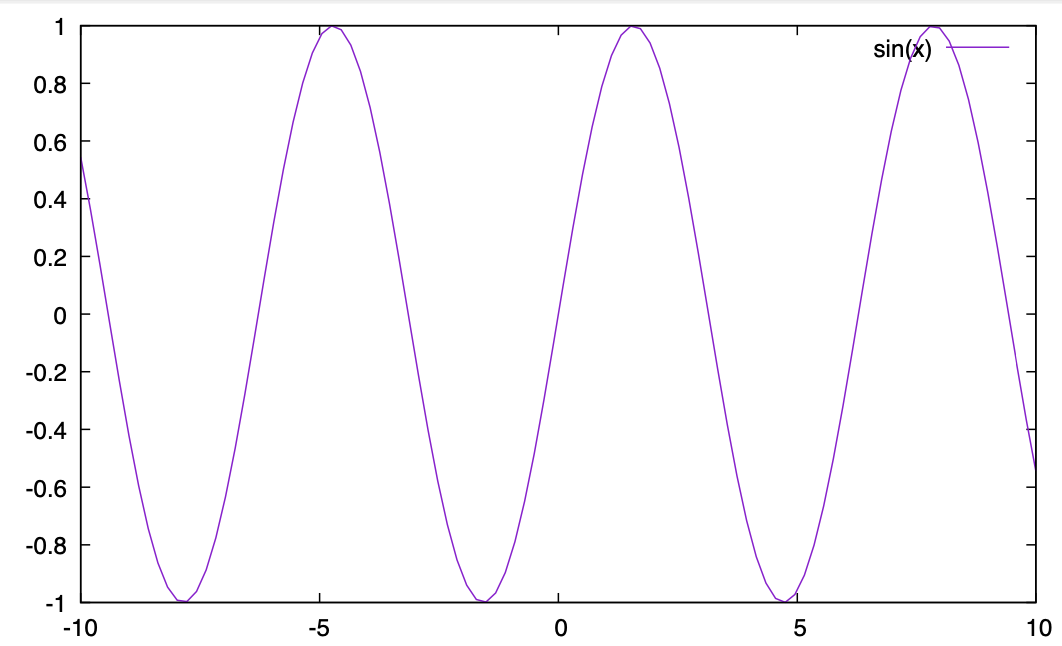
おおー、治った。良かった。