Day 1: Setting Up Your Environment
Programs run on supercomputers are parallel programs. Thus, in a narrow sense, “using a supercomputer” means “running a parallelized program.” If you run a parallel program written by someone else on a supercomputer, you are already using one. That is perfectly fine, but this text is titled Become a Supercomputer Programmer in One Week!, so our goal is to become able to develop code that runs on a supercomputer. In other words, we are going to do parallel programming. The words “parallel programming” may make it sound difficult. However, like many things that look difficult at first glance, parallel programming is not particularly hard. On the first day, we will begin by setting up a local parallel-programming environment and getting our first taste of parallel programming.
What Is MPI?
Section titled “What Is MPI?”There are several kinds of “parallelization.” The three commonly used parallel-programming models are data parallelism, shared-memory parallelism, and distributed-memory parallelism. In what follows, I will use terms such as process and thread somewhat loosely. Readers who want a rigorous treatment should consult a proper textbook. In particular, discussing differences between processes on Windows and Linux would take us too far afield, so I will not cover them here. We will also set data parallelism aside for now.
In shared-memory parallelism, the units of parallel execution share memory. Threads are normally used as those units, so I will call it thread parallelism here. Conversely, in distributed-memory parallelism, the units of parallel execution do not share memory. Processes are normally used as those units, so I will call it process parallelism here. There is also hybrid parallelism, which combines process and thread parallelism.
Let us first look at the difference between processes and threads. From the operating system’s point of view, a process is a unit for managing resources. The OS grants a process various permissions, but the most important point is that the OS assigns each process its own memory space. Different processes have different memory spaces and, without appropriate privileges, cannot access another process’s memory. Otherwise there would be serious security problems.
A thread is a unit of CPU use. Ordinarily, only one thread can use a CPU core at a time, setting technologies such as SMT aside. Every process has at least one thread, and executing a program means that a thread obtains use of a CPU core. The following diagram illustrates this relationship.
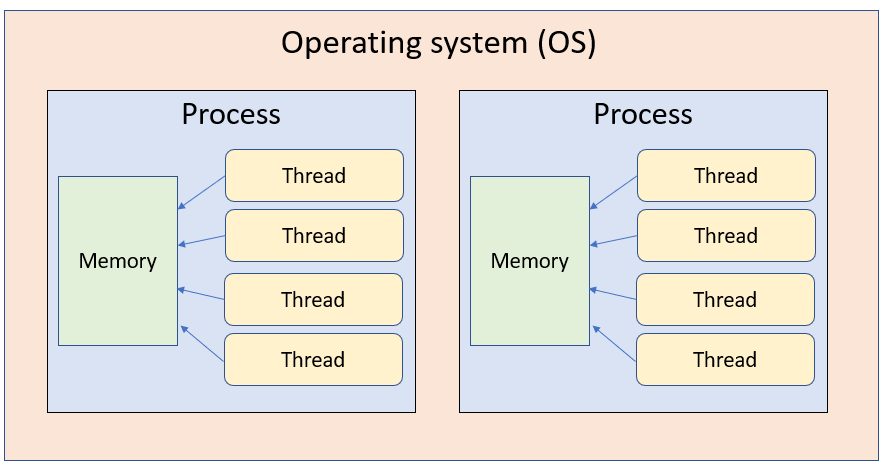
In thread parallelism, multiple threads are created within one process, and performance is improved by having those threads use multiple CPU cores. Because the threads share one memory space, this is shared-memory parallelism. Parallelization may be introduced, for example, by adding OpenMP directives or by explicitly creating and controlling threads with std::thread. Threads in the same process share memory, so they do not have to communicate with one another. The programmer is responsible, however, for mutual exclusion so that multiple threads do not modify the same location simultaneously. Some compilers provide automatic parallelization; the parallelism they produce is this kind of thread parallelism.
In process parallelism, multiple processes are launched and the threads belonging to those processes use CPU cores to improve performance. Process parallelism is implemented with a library called MPI (Message Passing Interface). Each process has its own memory space, which is normally invisible to other processes, so the processes must communicate as needed to perform meaningful work in parallel.
Thread parallelism is generally considered more approachable than process parallelism. Suppose we have a simple loop like this:
const int SIZE = 10000;void func(double a[SIZE], double b[SIZE]) { for (int i=0; i < SIZE; i++) { a[i] += b[i]; }}To parallelize it with OpenMP threads, all we need to do is add a directive like this:
const int SIZE = 10000;void func(double a[SIZE], double b[SIZE]) {#pragma omp parallel for // Instruct OpenMP to parallelize the loop for (int i=0; i < SIZE; i++) { a[i] += b[i]; }}Doing the same thing with MPI requires considerably more code, and a poor implementation may introduce enough overhead to make it inefficient. Thread parallelism, however, operates within a process. A single process cannot span multiple operating systems, so thread parallelism alone cannot use multiple nodes at once. We will explain nodes later.
With process parallelism, each process has independent memory. If a process needs data held by another process, they must communicate. The user must request this communication explicitly through function calls. Communication can also take place with a process running under another OS on different hardware, however, which makes it possible to use multiple nodes simultaneously.
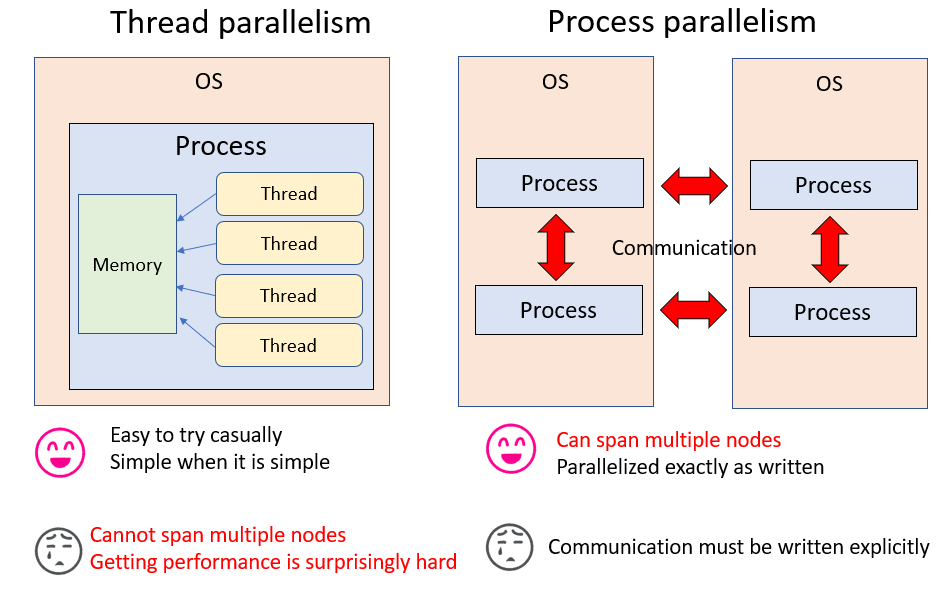
The figure above briefly summarizes the difference between thread and process parallelism. Our objective is to become “supercomputer programmers.” A supercomputer is a collection of nodes, and supercomputer programming means using multiple nodes together. Process parallelism is therefore logically necessary for supercomputer programming. For that reason, this text mainly covers distributed-memory parallelism with MPI.
Aside: Is MPI Difficult?
Section titled “Aside: Is MPI Difficult?”People sometimes say that thread parallelism is easy and MPI is difficult. After spending a fair amount of time around supercomputers, my impression is almost the opposite: thread parallelism is the harder of the two, while MPI is tedious but not difficult.
It is true that OpenMP can parallelize a program with a single added line and sometimes deliver several times the performance. When performance does not improve, however, investigating why is extremely difficult. OpenMP hides how the code was parallelized. In practice, you have to read the compiler’s reports and investigate while inferring how parallelization was performed. Furthermore, multiple threads access the same memory concurrently, which can produce bugs that occur only under particular timing. Debugging this kind of multithreaded program is generally hell. I certainly do not want to do it.
MPI often requires writing a lot of details and is admittedly tedious. But it basically parallelizes the program “exactly as written.” I can picture experts reading this and protesting that this is not true, but I mean it in comparison with OpenMP. Moreover, each process owns its own memory. Even during communication, another process writes into a buffer that you prepared, so you know when, where, who, and how much will be written. This is extremely valuable information when debugging.
My view, therefore, is: “If you are going to parallelize the program anyway, why not write it with MPI from the beginning? Then it can use multiple nodes too.” Apart from initialization (MPI_Init) and cleanup (MPI_Finalize), knowing just two MPI functions—point-to-point communication (MPI_Sendrecv) and collective communication (MPI_Allreduce)—is enough to accomplish most things. When you need something more complicated, you can look it up then.
Installing MPI
Section titled “Installing MPI”Before using a supercomputer, let us become familiar with parallel programming with MPI on a local PC. I strongly recommend macOS or Linux as the MPI development environment. More precisely, I do not know how to set up a parallel-programming environment on Windows. Any Linux distribution will do, but this text assumes CentOS. Readers of this text probably already have access to at least GCC. Installing MPI completes the parallel-programming environment.
If you use Homebrew on a Mac, one command is enough:
brew install openmpiOn CentOS, use:
sudo yum install openmpi-develexport PATH=$PATH:/usr/lib64/openmpi/bin/That is all. Be careful not to use
sudo yum install openmpibecause this does not install the development environment.
You can verify the installation by checking whether the MPI compiler mpic++ is on your path.
In fact, mpic++ is merely a wrapper that configures include paths and linking on the user’s behalf; the actual compiler is clang++ or g++.
For example, on a Mac:
$ mpic++ --versionApple LLVM version 10.0.0 (clang-1000.11.45.2)Target: x86_64-apple-darwin17.7.0Thread model: posixInstalledDir: /Applications/Xcode.app/Contents/Developer/Toolchains/XcodeDefault.xctoolchain/usr/binThis shows that it invokes clang++. On Linux, it invokes g++.
$ mpic++ --versiong++ (GCC) 4.8.5 20150623 (Red Hat 4.8.5-28)Copyright (C) 2015 Free Software Foundation, Inc.This is free software; see the source for copying conditions. There is NOwarranty; not even for MERCHANTABILITY or FITNESS FOR A PARTICULAR PURPOSE.Therefore, if you specify the include paths and linker settings explicitly, you do not need to invoke mpic++.
Some supercomputer sites set the MPI include path through environment variables. In that case, MPI code may compile as-is with g++, icpc, or another compiler. Be aware that linking still requires -lmpi and, in some environments, -lmpi_cxx as well.
Your First MPI Program
Section titled “Your First MPI Program”Once the environment is ready, write the following code and save it as hello.cpp.
#include <cstdio>#include <mpi.h>
int main(int argc, char **argv) {  MPI_Init(&argc, &argv);  printf("Hello MPI World!\n");  MPI_Finalize();}
Compile and run it as follows:
$ mpic++ hello.cpp$ ./a.outHello MPI World!Before running it in parallel, let us take the opportunity to confirm that it can be compiled without mpic++. On a Mac, trying to compile hello.cpp above with g++ produces an error saying that mpi.h cannot be found.
$ g++ hello.cpphello.cpp:2:10: fatal error: mpi.h: No such file or directory #include <mpi.h> ^~~~~~~compilation terminated.We therefore tell the compiler where it is. Specifying only the header location causes another complaint that the library cannot be found, so tell it that location too.
g++ hello.cpp -I/usr/local/opt/open-mpi/include -L/usr/local/opt/open-mpi/lib -lmpi -lmpi_cxxIt now compiles successfully. On the author’s CentOS machine, the corresponding command was:
g++ test.cpp -I/usr/include/openmpi-x86_64 -L/usr/lib64/openmpi/lib -lmpi -lmpi_cxxThe paths differ by environment, but specifying the include path, library path, and the -lmpi library (plus -lmpi_cxx in some environments) lets you compile without mpic++. Remembering that “mpic++ is only a wrapper, and any compiler can be used when the headers and libraries are specified correctly” can occasionally help when MPI trouble occurs.
Now let us run it in parallel. For parallel execution, pass the program and number of processes to mpirun.
$ mpirun -np 2 ./a.outHello MPI World!Hello MPI World!The message appears twice. The following happened when the program ran:
mpirunsees-np 2and launches two processes.MPI_Initinitializes the communication environment.- Each process executes
Hello MPI Worldindependently. MPI_Finalizeshuts down the communication environment.
Launching multiple processes that perform some work already makes this a genuine parallel program. As written, however, every process can only perform the same operation. MPI therefore assigns a consecutive number called a rank to every launched process and uses these ranks for parallel processing.
MPI assigns a consecutive number to each launched process. This number is called its rank.
Use MPI_Comm_rank to obtain it.
int rank;MPI_Comm_rank(MPI_COMM_WORLD, &rank);After this call, rank contains the rank number. When running with N processes, ranks range from 0 through N-1.
Let us try it. Save the following as rank.cpp, then compile and run it.
#include <cstdio>#include <mpi.h>
int main(int argc, char **argv) {  MPI_Init(&argc, &argv);  int rank;  MPI_Comm_rank(MPI_COMM_WORLD, &rank);  printf("Hello! My rank is %d\n", rank);  MPI_Finalize();}
Running it gives:
$ mpic++ rank.cpp$ mpirun -np 4 ./a.out--------------------------------------------------------------------------There are not enough slots available in the system to satisfy the 4 slotsthat were requested by the application:  ./a.out
Either request fewer slots for your application, or make more slots availablefor use.--------------------------------------------------------------------------
Oops—an error. It says that the number of processes exceeds the predefined number of slots.
This occurs on the author’s Mac but not on Linux. If you see it, add the --oversubscribe option to mpirun.
$ mpirun --oversubscribe -np 4 ./a.outHello! My rank is 0Hello! My rank is 2Hello! My rank is 1Hello! My rank is 3Each process now reports a different rank number.
An MPI program creates replicas of exactly the same source code. The only difference is the rank. The programmer therefore writes parallel processing by changing the work according to the rank number. You are free to do this any way you like. For example, when running four processes, you could write:
#include <cstdio>#include <mpi.h>
int main(int argc, char **argv) {  MPI_Init(&argc, &argv);  int rank;  MPI_Comm_rank(MPI_COMM_WORLD, &rank);  if (rank == 0) {    // Work for rank 0  } else if (rank == 1) {    // Work for rank 1  } else if (rank == 2) {    // Work for rank 2  } else if (rank == 3) {    // Work for rank 3  }  MPI_Finalize();}
This can make ranks 0 through 3 perform completely unrelated jobs. Usually one does not write a program this way, but instead uses the sample parallelism, parameter parallelism, or domain decomposition described later. That is merely what is usually done, however—not a requirement. To summarize:
- MPI launches multiple processes.
- Each process receives a unique consecutive number called a rank.
- An MPI program performs different work in each process by changing its behavior according to its rank.
That is the essence of an MPI program. Rank numbers remain unique even when MPI processes are launched across multiple nodes. For example, running four processes per node on ten nodes launches 40 processes in total, assigned ranks 0 through 39. Be aware that how those ranks are assigned to nodes depends on the configuration.
Standard Output
Section titled “Standard Output”Suppose you execute an MPI program in a terminal with:
mpirun -np 4 ./a.outFour processes are launched. Each receives a PID and has its own memory space, but all four share standard output. If all of them try to write at once, they contend for that output. Coordination takes place behind the scenes so that one process does not write in the middle of another process’s output and mix the results. Displaying something on a screen is actually a rather deep topic; readers interested in the details should see tanakamura’s Practical Low-Level Programming.
For now, the important point is that there is only one standard-output resource and four processes use it.
Contention is avoided by letting a single process exclusively use it for each indivisible unit of work.
One such unit might be everything from the start to the end of one printf call.
For example, the earlier rank.cpp contained:
printf("Hello! My rank is %d\n", rank);Each process first constructs the string it should output, such as Hello! My rank is 0, and then writes it as a unit.
Conceptually, the four instructions
puts("Hello! My rank is 0");puts("Hello! My rank is 1");puts("Hello! My rank is 2");puts("Hello! My rank is 3");execute in a random order. Even if their order changes, the result is merely something like:
puts("Hello! My rank is 0");puts("Hello! My rank is 2");puts("Hello! My rank is 1");puts("Hello! My rank is 3");so the displayed output is not badly garbled.
Now let us write a similar program with std::cout. Save the following as rank_stream.cpp, then compile and run it.
#include <iostream>#include <mpi.h>
int main(int argc, char **argv) {  MPI_Init(&argc, &argv);  int rank;  MPI_Comm_rank(MPI_COMM_WORLD, &rank);  std::cout << "Hello! My rank is " << rank << std::endl;  MPI_Finalize();}
In this case, the active process—and thus exclusive ownership of standard output—may switch at each << operator.
Conceptually, the following instructions may execute in a random order:
std::cout << "Hello! My rank is ";std::cout << "0";std::cout << std::endl;std::cout << "Hello! My rank is ";std::cout << "1";std::cout << std::endl;std::cout << "Hello! My rank is ";std::cout << "2";std::cout << std::endl;std::cout << "Hello! My rank is ";std::cout << "3";std::cout << std::endl;The display may consequently be garbled like this:
$ mpirun -np 4 ./a.outHello! My rank isHello! My rank is01Hello! My rank is 3
Hello! My rank is 2
Whether this happens depends on the system’s buffering, which in turn depends on the MPI implementation.
See: Coordination Between MPI Processes and Standard-Output Buffering (Japanese)
In other words, output that is orderly on your machine may be garbled on another. If you need standard output, it is better to assemble each message in a std::stringstream before writing it all at once, or simply use printf.
Standard output is fine for debugging an MPI program, but it is not particularly advisable for writing results or reporting calculation progress. We will return to this when discussing job execution with a job scheduler.
Open MPI also provides an option to write each rank’s standard output to a separate file.
See: Debugging MPI Programs (Japanese)
For example, with the preceding program, running
mpirun --output-filename hoge -np 4 ./a.outon Linux creates one file named hoge.1.X per process instead of using standard output. The contents look like this:
$ ls hoge.*hoge.1.0  hoge.1.1  hoge.1.2  hoge.1.3
$ cat hoge.1.0Hello! My rank is 0
$ cat hoge.1.1Hello! My rank is 1
On a Mac, the same operation creates a directory tree as follows:
$ mpiexec --output-filename hoge -np 4 --oversubscribe ./a.outHello! My rank is 0Hello! My rank is 1Hello! My rank is 2Hello! My rank is 3
$ tree hogehoge└── 1    ├── rank.0    │   ├── stderr    │   └── stdout    ├── rank.1    │   ├── stderr    │   └── stdout    ├── rank.2    │   ├── stderr    │   └── stdout    └── rank.3        ├── stderr        └── stdout
The program still writes to standard output, while each process’s standard output and standard error are also saved under its directory. This can occasionally be useful to remember.
Debugging MPI Programs with GDB
Section titled “Debugging MPI Programs with GDB”Some readers may routinely use GDB to debug programs. Debugging parallel programs is generally extremely tedious, but knowing how to debug an MPI program with GDB may prove useful someday. Perhaps this is just me, but I also sometimes find it easier to understand a program’s behavior by analyzing it through GDB than by reading its source. This section therefore explains how to attach GDB to an MPI process. If you do not ordinarily use GDB, feel free to skip it.
GDB can debug only one process at a time, whereas an MPI program launches multiple processes. There are consequently two possible approaches:
- Attach GDB to every process that was launched.
- Attach GDB to only one particular process.
We will use the latter approach. Both methods are described in the Open MPI FAQ: Debugging applications in parallel, should you be interested.
GDB can attach to a running process by its process ID. We will first start the MPI program and then attach GDB to a chosen process. We need the MPI program to wait at a particular point until GDB has attached, however. Our procedure is therefore:
- Deliberately write code that enters an infinite loop.
- Run the MPI program.
- Attach GDB to a particular process.
- Modify a variable in GDB to escape the infinite loop.
- Debug the rest however you like.
For some reason, attaching GDB to an MPI process did not work on macOS, so the following was performed on CentOS. Save this program as gdb_mpi.cpp.
#include <cstdio>#include <sys/types.h>#include <unistd.h>#include <mpi.h>
int main(int argc, char **argv) {  MPI_Init(&argc, &argv);  int rank;  MPI_Comm_rank(MPI_COMM_WORLD, &rank);  printf("Rank %d: PID %d\n", rank, getpid());  fflush(stdout);  int i = 0;  int sum = 0;  while (i == rank) {    sleep(1);  }  MPI_Allreduce(&rank, &sum, 1, MPI_INT, MPI_SUM, MPI_COMM_WORLD);  printf("%d\n", sum);  MPI_Finalize();}
We have not yet covered MPI_Allreduce; it is a function that computes the sum of a variable across all processes.
This code prints its own PID, after which only the rank-0 process enters an infinite loop.
Compile it with -g and run four processes for now.
$ mpic++ -g gdb_mpi.cpp$ mpirun -np 4 ./a.outRank 2: PID 3646Rank 0: PID 3644Rank 1: PID 3645Rank 3: PID 3647Four processes have started. Because rank 0 is in an infinite loop, the other processes are waiting. Let us attach to rank 0. Open another terminal, start GDB, and attach it to rank 0’s PID. The PID changes on every run; here it is 3644.
$ gdb(gdb) attach 3644Attaching to process 3644Reading symbols from /path/to/a.out...done.(snip)(gdb)Display a backtrace:
(gdb) bt#0 0x00007fc229e2156d in nanosleep () from /lib64/libc.so.6#1 0x00007fc229e21404 in sleep () from /lib64/libc.so.6#2 0x0000000000400a04 in main (argc=1, argv=0x7ffe6cfd0d88) at gdb_mpi.cpp:15The process is sleeping, so we can see that main called sleep, which in turn called nanosleep.
Return to main by entering finish twice.
(gdb) finishRun till exit from #0 0x00007fc229e2156d in nanosleep () from /lib64/libc.so.60x00007fc229e21404 in sleep () from /lib64/libc.so.6(gdb) finishRun till exit from #0 0x00007fc229e21404 in sleep () from /lib64/libc.so.6main (argc=1, argv=0x7ffe6cfd0d88) at gdb_mpi.cpp:1414 while (i == rank) {We are back in main. The program will next store the sum of all rank numbers in sum, so set a watchpoint on sum.
(gdb) watch sumHardware watchpoint 1: sumAt present, i is 0, so the loop would continue forever. Change its value and continue.
(gdb) set var i = 1(gdb) cContinuing.Hardware watchpoint 1: sum
Old value = 0New value = 10x00007fc229eaa676 in __memcpy_ssse3 () from /lib64/libc.so.6
The watchpoint has triggered. Display a backtrace here.
(gdb) bt#0 0x00007fc229eaa676 in __memcpy_ssse3 () from /lib64/libc.so.6#1 0x00007fc229820185 in opal_convertor_unpack () from /opt/openmpi-2.1.1_gcc-4.8.5/lib/libopen-pal.so.20#2 0x00007fc21e9afbdf in mca_pml_ob1_recv_frag_callback_match () from /opt/openmpi-2.1.1_gcc-4.8.5/lib/openmpi/mca_pml_ob1.so#3 0x00007fc21edca942 in mca_btl_vader_poll_handle_frag () from /opt/openmpi-2.1.1_gcc-4.8.5/lib/openmpi/mca_btl_vader.so#4 0x00007fc21edcaba7 in mca_btl_vader_component_progress () from /opt/openmpi-2.1.1_gcc-4.8.5/lib/openmpi/mca_btl_vader.so#5 0x00007fc229810b6c in opal_progress () from /opt/openmpi-2.1.1_gcc-4.8.5/lib/libopen-pal.so.20#6 0x00007fc22ac244b5 in ompi_request_default_wait_all () from /opt/openmpi-2.1.1_gcc-4.8.5/lib/libmpi.so.20#7 0x00007fc22ac68955 in ompi_coll_base_allreduce_intra_recursivedoubling () from /opt/openmpi-2.1.1_gcc-4.8.5/lib/libmpi.so.20#8 0x00007fc22ac34633 in PMPI_Allreduce () from /opt/openmpi-2.1.1_gcc-4.8.5/lib/libmpi.so.20#9 0x0000000000400a2c in main (argc=1, argv=0x7ffe6cfd0d88) at gdb_mpi.cpp:17A long chain of function calls appears. MPI is a standard with many implementations; what we see here is Open MPI’s implementation. You can see plausible-looking internal functions such as ompi_coll_base_allreduce_intra_recursivedoubling. Interested readers may enjoy downloading the Open MPI source and comparing it with this trace.
Now continue. Continuing twice terminates the program.
(gdb) cContinuing.Hardware watchpoint 1: sum
Old value = 1New value = 60x00007fc229eaa676 in __memcpy_ssse3 () from /lib64/libc.so.6(gdb) cContinuing.[Thread 0x7fc227481700 (LWP 3648) exited][Thread 0x7fc226c80700 (LWP 3649) exited]
Watchpoint 1 deleted because the program has left the block inwhich its expression is valid.0x00007fc229d7e445 in __libc_start_main () from /lib64/libc.so.6
The terminal running mpirun should also display the following and terminate:
$ mpic++ -g gdb_mpi.cpp$ mpirun -np 4 ./a.outRank 2: PID 3646Rank 0: PID 3644Rank 1: PID 3645Rank 3: PID 36476666This section explained only how to attach GDB to an MPI process. Anyone reading this section probably already knows GDB well enough to debug as they please once attached. In my experience, however, debugging parallel programs with GDB is a last resort. It is preferable to write careful, fine-grained tests and prevent bugs from entering the program in the first place.